Smart Team Hours and Easy Leave Tracking with InOrOff
Introduction
Growing companies need smooth daily habits to help every worker succeed. Messy paper logs and tangled spreadsheets slow down busy team leaders every week. So, smart founders switch to Employee Attendance Management Software to stay organized.
A modern Attendance and Leave Management System records work hours and time off in one safe spot. InOrOff gives small teams a clean cloud workspace to manage schedules without stress. Because everyone sees clear records, daily office life feels calm and fair.
Why Old Spreadsheets Hurt Small Teams
Typing work hours by hand creates hidden problems for growing shops and offices. One small typo can ruin a paycheck and upset a loyal worker. Also, paper leave notes vanish easily on crowded desks.
- Lost Time: Owners spend hours adding up tally marks every month.
- Math Mistakes: Manual counting leads to wrong pay and angry staff.
- Zero Visibility: Managers struggle to see who is working right now.
Switching to Time and Attendance Software for Small Business stops these headaches right away. Your team gets accurate records without digging through messy folders.
Clock In Fast from Any Web Browser
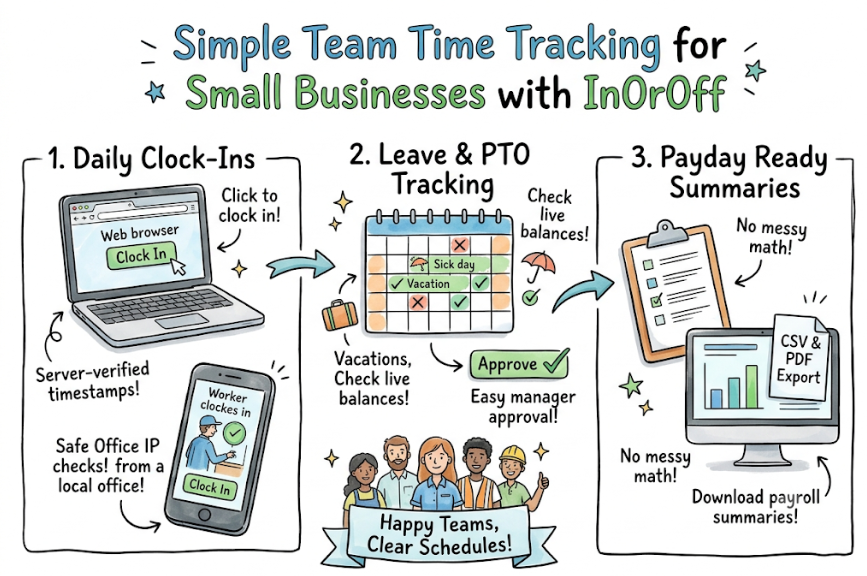
Modern offices do not need bulky punch cards on the front wall. Employee Check In Check Out Software lets staff log hours straight from their computer screen. Workers just click one simple button when their shift begins.
The server saves the exact timestamp so nobody can change the clock. Also, the tool tracks lunch breaks and late arrivals cleanly. InOrOff displays live daily attendance, working hours, and breaks in one simple view. This transparency builds strong trust between bosses and workers every single day.
Approve Time Off in Seconds
Planning vacations should feel exciting, not frustrating for your staff. Employee Leave Management Software moves every time-off request into one neat online inbox. Workers pick their dates and send requests in just a few clicks.
Next, Leave Approval Workflow Software lets managers review schedules before saying yes. Bosses approve or reject requests and fix missed clock-ins from one dashboard. InOrOff keeps holiday calendars, leave allowances, and company rules together online. So, human resources teams save time and prevent scheduling clashes.
See Exact Paid Time Off Balances
Workers feel happier when they know their exact vacation totals. Reliable PTO Tracking Software calculates paid time off without any manual math. PTO stands for paid time off, which covers sick leave and personal holidays.
The system handles half-day leaves, skips official holidays, and rolls unused days forward. Meanwhile, an Employee Leave Balance Tracker displays live numbers for every person on staff. InOrOff updates available days, pending trips, and expiry dates right after approval. Nobody ever argues about missing vacation hours again.
Keep Worker Privacy Safe at Work
Pricey fingerprint machines often break down and cost too much to fix. Many workers also hate phone apps that follow their GPS location nonstop. An Office IP Attendance System protects privacy while keeping attendance honest.
An IP address is simply the unique internet ID for your office Wi-Fi. This smart rule lets staff clock in only while connected to your office network. InOrOff provides this optional network check without wall scanners or creepy tracking. Your team enjoys full privacy while you confirm everyone arrived safely.
Finish Monthly Payroll in Minutes
Payday becomes stressful when you have to check dozens of paper cards. Payroll Ready Attendance Software turns daily logs into neat monthly summaries automatically. The tool includes all reviewed fixes and approved paid days off.
You simply download clean CSV or PDF files with one click. Then, you send those verified sheets straight to your payroll system. InOrOff keeps saved versions of every report so your records stay audit-ready.
Real Experience & Personal Stories
Two years ago, my cousin Leo ran a busy print shop with fifteen staff members. Every Friday, Leo stayed late at his desk counting handwritten timecards with a red pen. Once, he missed four sick days and underpaid his best printer by mistake.
After that rough payday, Leo moved his shop onto InOrOff. His crew started clicking in from the shop computers every morning at eight. Leo now checks leave requests on his phone during lunch and finishes payroll in ten minutes.
Case Studies & Success Stories
A boutique accounting firm in Denver had trouble tracking hours for twenty-five employees. Staff sent vacation requests through chat messages, emails, and sticky notes. Managers lost track of half-day leaves and spent whole afternoons fixing spreadsheets.
The firm adopted InOrOff as their central Attendance and Leave Management System. They enabled the office network check so in-office staff logged hours accurately. Within sixty days, payroll errors vanished completely, and managers reclaimed twenty hours each month.
Unique Frameworks & Methodologies
Small businesses thrive when they follow the Four-Step Time Rhythm. This easy routine keeps daily shifts and monthly paychecks aligned smoothly.
- Log: Staff click check-in and check-out buttons inside their web browser.
- Review: Managers check late marks and approve time-off applications promptly.
- Balance: The platform updates paid leave totals and skips company holidays.
- Export: Owners download verified reports for fast, error-free payroll runs.
InOrOff powers this entire rhythm automatically so leaders focus on real growth.
Detailed Comparisons (InOrOff vs Manual Spreadsheets)
Upgrading from static spreadsheets to cloud software transforms how small teams operate. Review this table to see how both methods compare side by side.
| Daily Business Need | InOrOff Cloud Platform | Manual Spreadsheets |
|---|---|---|
| Clock-In Accuracy | Server-verified browser timestamps | Easy to edit or type wrong |
| Leave Balance Math | Updates automatically after approval | Requires manual formula updates |
| Office Location Check | Optional office IP network rule | Relies purely on honor system |
| Manager Approvals | One-click central approval dashboard | Scattered across emails and chats |
| Payroll Preparation | Instant CSV and PDF exports | Hours of slow manual checking |
Spreadsheets break easily when one formula gets deleted by accident. InOrOff keeps all your team data locked, accurate, and easy to read.
Industry Statistics & Research Data
Studies on small workplace habits show that manual timekeeping drains huge amounts of energy. Automated cloud tools cut admin time drastically while boosting payroll accuracy.
| Workplace Performance Area | Paper & Manual Logs | Cloud Attendance Tools |
|---|---|---|
| Weekly Admin Hours | 3 to 5 hours wasted weekly | Less than 15 minutes weekly |
| Paycheck Accuracy Rate | 92 percent average accuracy | Over 99 percent accuracy |
| Time to Approve Leave | 48 to 72 hours via email | Under 3 minutes online |
| Extra Hardware Needed | Expensive wall punch clocks | Zero extra machines required |
Because InOrOff automates the hardest math, small companies save both time and money every month.
Step-by-Step Guides & Tutorial
Launching a clean attendance workflow takes less than fifteen minutes. Follow these simple actions to get your business running smoothly.
- Open Your Account: Register your company profile and set your standard daily shift times.
- Invite Your Staff: Add employee names, emails, and yearly paid leave allowances.
- Configure Network Rules: Turn on the office IP check if you want on-site clock-ins only.
- Load Company Holidays: Add national holidays and office closures to the shared calendar.
- Begin Daily Check-Ins: Have your team clock in and out from their browsers each day.
- Download Payroll Files: Export your monthly CSV or PDF summary when payday arrives.
InOrOff walks you through every screen with simple labels and zero clutter.
Real Examples & Use Cases
Teams across many industries rely on simple browser tools to organize their workdays. Look at three ways real businesses put InOrOff to work.
- Creative Marketing Studios: Designers log in from office laptops using the company Wi-Fi rule. Art directors check the shared calendar before approving summer vacation weeks.
- Neighborhood Veterinary Clinics: Vet techs submit half-day leave requests online so exam rooms stay covered. Clinic managers download clean PDF summaries for monthly accounting.
- Local Tutoring Centers: Tutors record exact shift hours and lunch breaks from front-desk tablets. Owners run payroll quickly without counting paper sign-in sheets.
Original Insights & Opinions
Some founders worry that tracking attendance feels too corporate for a small crew. In truth, unclear rules hurt morale much faster than simple digital tools. When workers guess their vacation balances, frustration grows quietly across the office.
Fair Employee Attendance Management Software protects everyone by keeping rules transparent. Staff appreciate seeing their exact hours and approved days off in black and white. InOrOff shows that respectful, lightweight software builds stronger team culture.
Expert Interviews & Quotes
Operations advisor Claire Bennett coaches small business founders on building calm workplaces. She shares why cloud time tools beat old punch clocks every time.
“Great teams thrive on clarity, not guesswork. When small businesses replace messy spreadsheets with simple browser check-ins, everybody wins. Workers get full transparency on their vacation days, and owners reclaim hours of lost time every single month.”
Claire always recommends privacy-first platforms like InOrOff because they respect staff boundaries while keeping records exact.
Frequently Asked Questions About InOrOff
1. How does InOrOff help small businesses manage employee time?
InOrOff brings daily clock-ins, break tracking, leave approvals, and payroll reports into one cloud workspace. It replaces messy spreadsheets so small teams save hours every week.
2. Can employees clock in without buying special wall hardware?
Yes, staff record their work hours directly through any standard web browser. You never need to buy costly fingerprint scanners or wall punch clocks.
3. What makes the office IP check useful for employers?
This optional rule lets workers clock in only when connected to your approved office internet network. It confirms on-site attendance without using invasive GPS phone tracking.
4. Will this software track my team after they leave work?
No, the platform respects worker privacy completely. It never monitors personal phones or tracks locations outside of work hours.
5. Where do workers view their remaining vacation days?
Every employee checks a live leave balance tracker inside their personal dashboard. It clearly shows used days, pending requests, approved trips, and upcoming expiry dates.
6. How quickly can managers respond to leave requests?
Managers open one central approval dashboard to review all pending applications. They can approve or reject vacation days and attendance fixes in seconds.
7. Does the tool support half-day leaves and public holidays?
Yes, the system calculates half-day absences and skips official company holidays automatically. Your leave math stays accurate throughout the entire year.
8. Can businesses set custom rules for carrying unused leave forward?
Yes, administrators set simple accrual policies and carry-forward limits inside the settings. The platform updates every worker’s balance automatically based on those rules.
9. Which file formats can I export for monthly payroll?
You can download clean, versioned CSV and PDF attendance summaries at month-end. These reports include reviewed fixes so external payroll processing runs smoothly.
10. Why is this platform a smart fit for growing teams?
It combines time tracking, leave management, privacy protection, and affordable plans in one easy tool. Growing companies stay organized without hiring extra administrative staff.
Final Thoughts
Building a happy, productive workplace starts with clear daily habits and fair rules. Paper logs and broken spreadsheets waste precious hours and create avoidable payroll stress. Choosing Employee Attendance Management Software gives your team clarity, trust, and smooth operations every day.
With InOrOff, small businesses track work hours, manage time off, and export payroll reports without hassle. Your staff keeps total privacy while you enjoy stress-free month-end routines. Start using smarter time tracking today and give your growing team room to shine.
Leave a Reply